

The strongest-looking repair isn't always the safest one for a delicate 3D print. A snapped detail can tempt you to reach for the nearest glue, but the wrong method may leave a visible seam or cause more damage. If you're wondering how to repair a broken 3d printed model, first identify the material and inspect the break. A clean join needs a different approach from a crushed edge or missing fragment.
Before choosing a repair, check whether the pieces fit together naturally, whether the joint needs to bear weight, and how close the break is to fine detail. This guide explains how to assess the damage, choose an adhesive or reinforcement, and make a controlled repair. Sometimes careful bonding is enough; in other cases, rebuilding or accepting a visible repair may protect the surrounding detail better.
Resin components, including delicate narrow-gauge model parts, should be handled carefully. Avoid dropping them and hold them by thicker sections. Resin parts are cleaned and UV-cured before dispatch, though many modellers may wish to give them a quick wash in mild soapy water before priming. Fine support marks or layer lines may remain; if needed, sand gently with fine-grit 800 to 1200.
Key Takeaways
- Learn how to repair a broken 3d printed model by identifying its material and checking whether the damaged surfaces fit cleanly together.
- Choose a repair method to suit the material and damage. Test adhesive discreetly before applying it near fine details.
- Prepare and align the parts carefully, then bond or reinforce them without forcing mismatched edges together.
- Resin is delicate, so avoid drops and handle parts by thicker sections. Parts are cleaned and UV-cured before dispatch; fine support marks or layer lines may remain. Gentle sanding with fine-grit 800 to 1200 may help, and a quick wash in mild soapy water before priming may be useful.
- If a piece is broken in the post, provide images so the damage can be reviewed.
What to check first when a 3D-printed model breaks
Before reaching for adhesive, inspect the part. A neat break with two matching faces is different from a crushed edge, a missing fragment or a fracture through fine detail. Identifying the material and the extent of the damage helps you decide whether the pieces can be joined as they are or need another approach.
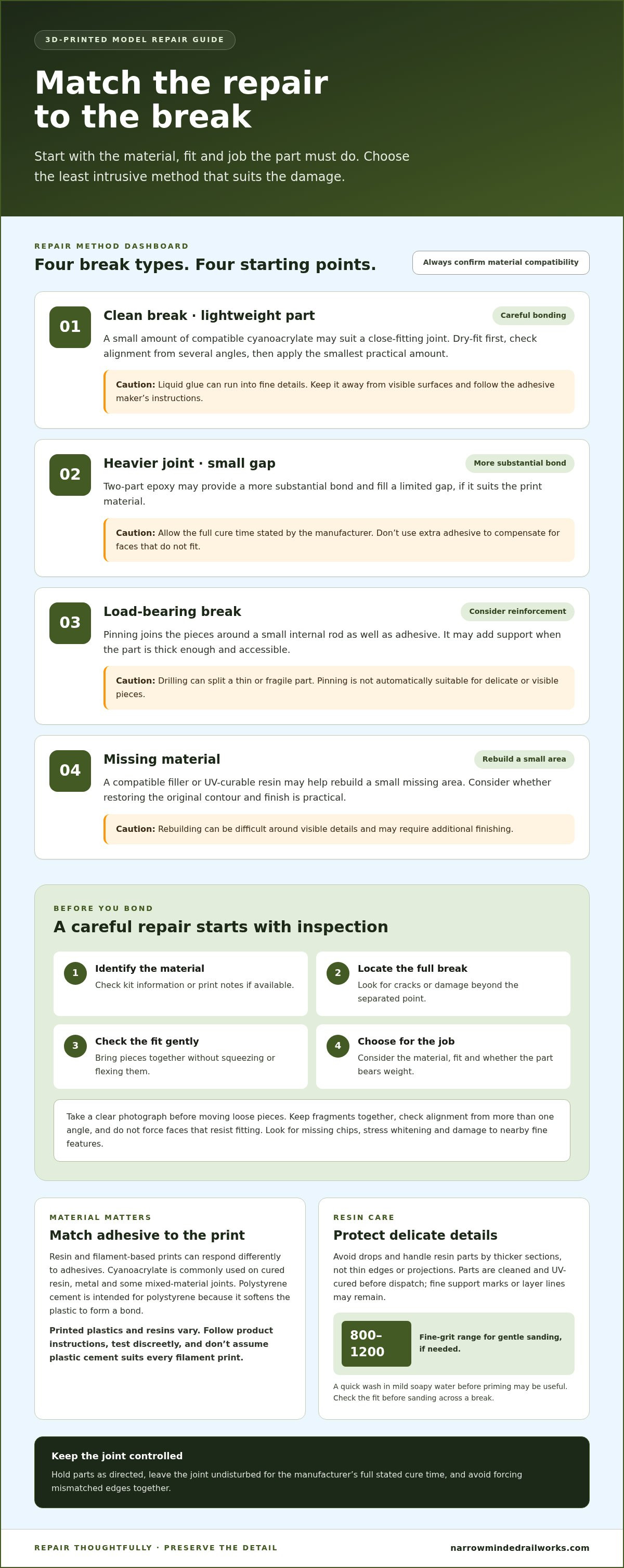
- Identify the material. Check the kit information or print notes if available.
- Locate the full break. Look for cracks or damage beyond the point where the part separated.
- Check the fit. Bring the pieces together gently, without squeezing or flexing them.
- Choose a repair method. Consider the material, the fit and whether the part must bear weight.
Take a clear photograph before moving loose pieces. It records their original position and can help you see where fragments belong. Test-fit the parts without glue, then check the alignment from more than one angle. If the faces resist fitting, don't force them together. The material may be crushed or distorted, or a fragment may be missing.
How to assess the break before touching it
Check whether the broken faces meet naturally, then look for cracks, missing chips, stress whitening or damage to nearby features. Keep loose fragments together so they don't get lost, and avoid flexing thin sections while handling the model. If the break crosses a small handrail, cab detail or another fine feature, note its position before attempting a repair. Disturbing the area as little as possible makes it easier to judge what remains intact.
How print material changes the repair decision
Resin prints and filament-based prints can respond differently to adhesives and repair techniques, so don't assume one glue suits both. If you know the material, use that information to guide your choice. Appearance alone may not identify it reliably. 3D printing uses different materials and processes, as outlined in Understanding 3D Printing Technology. Follow the adhesive maker's instructions and test it on a discreet area before applying it near visible detail.
Resin model parts are delicate. Avoid drops and handle them by thicker sections rather than thin edges or projections. Resin parts are cleaned and UV-cured before dispatch, though fine support marks or layer lines may remain. If needed, sand gently with fine-grit 800 to 1200. Before priming, many modellers may wish to give the part a quick wash in mild soapy water. These are surface-preparation steps, not a reason to sand across a break before checking how the pieces fit.
How to choose a repair method for a broken 3D print
The best repair is usually the least intrusive one that suits the material and the job the part needs to do. A small decorative detail with a clean break may only need careful adhesive bonding. A larger joint that carries weight may need reinforcement, while a crushed edge or missing fragment calls for a decision about rebuilding or accepting a visible repair. No single adhesive or technique works for every print.
Use this comparison as a starting point, then confirm that your method suits the material and follow the adhesive instructions:
- Clean break, lightweight part: A small amount of compatible cyanoacrylate may suit a close-fitting joint. Caution: liquid glue can run into fine detail, so apply it in a controlled amount.
- Heavier joint or small gap: Two-part epoxy may provide a more substantial bond and fill a limited gap. Caution: allow the full stated cure time and make sure the adhesive suits the print material.
- Load-bearing break: Pinning, which joins the pieces around a small internal rod as well as adhesive, may add support if the part is thick enough and accessible. Caution: drilling can split a thin or fragile part.
- Missing material: A compatible filler or UV-curable resin may help rebuild a small area. Caution: restoring the original contour and finish can be difficult, especially around visible details.
When adhesive may suit a clean break
Dry-fit the parts first and check their alignment from several angles. Select an adhesive labelled as compatible with the identified material, then test it discreetly if possible. Apply the smallest practical amount, keeping it away from visible surfaces and nearby details. Hold the parts in position as directed and leave the joint undisturbed for the full cure time stated by the manufacturer. Don’t use extra adhesive to compensate for faces that don’t fit.
Material matters. Cyanoacrylate is commonly used on cured resin, metal and some mixed-material joints, while polystyrene cement is intended for polystyrene because it softens the plastic to form a bond. These examples aren’t universal rules: printed plastics and resins vary, so follow the product instructions rather than relying on appearance alone. Don’t assume plastic cement is suitable for every filament print.
When a break needs reinforcement or rebuilding
A larger break in a part that supports weight may need more than a surface bond. Pinning can help when there’s enough material for a small hole and the joint can be aligned safely, but it isn’t automatically appropriate for thin, visible or delicate pieces. Rebuilding missing material may restore the outline, but it can involve sanding and additional finishing. A visible repair may be safer when more intervention risks damaging surrounding detail.
For modellers working with delicate resin components, careful handling helps prevent extra damage during repair. Explore resin-printed narrow-gauge kits to see the kind of fine model parts that benefit from a considered approach.
How to repair a broken 3D-printed model without losing detail
A neat repair depends on control, not force. If you're working out how to repair a broken 3d printed model, protect nearby details and confirm the parts’ position before applying adhesive. A small shift at the break can leave a crooked joint, while excess glue or sanding can soften details that are difficult to restore.
A careful repair sequence for a clean break
Work on a stable, uncluttered surface with good light. Arrange the fragments so you can see how they fit, and keep the adhesive aside until you’ve confirmed their orientation. Follow this sequence, adapting it to the material and adhesive instructions:
- Prepare the surfaces. Make sure the joining faces are clean and dry. Avoid scraping or sanding the break unless the repair requires it and the material can tolerate it.
- Test-fit the pieces. Bring them together without adhesive. Check the join from different angles and confirm the surrounding features line up.
- Protect nearby detail. Keep glue away from fine edges, handrails, windows and other small features. If the joint is near a delicate area, plan how you’ll hold the part before applying adhesive.
- Bond or reinforce. Apply only the amount of compatible adhesive needed. Align the parts gently and hold them as directed by the adhesive maker. Don’t squeeze thin sections or force mismatched faces together.
- Let the joint cure. Leave the model undisturbed for the full stated cure time. Handling it early can shift the alignment or weaken the bond.
- Inspect before finishing. Once cured, check the join and nearby details under good light. Decide whether any excess needs attention before sanding or repainting.
How to protect small parts and surface detail
Resin is delicate, so handle it carefully, avoid drops and hold parts by thicker sections. Don’t twist a fragile component to test the strength of a fresh bond. If the break is beside a fine feature, support the sturdier body of the model rather than gripping the feature itself. A repair that remains slightly visible is often preferable to aggressive work that removes original detail.
If adhesive has squeezed out, don’t wipe it across the surface. Wait until it’s safe to remove according to the adhesive instructions, and use only a removal method known to be compatible with the model material. Solvents or scraping can mark the print, soften some plastics or damage paint, so avoid them unless their suitability is clear. If the excess can’t be removed safely, leaving a small trace may be the gentler option.
Sanding can reduce a raised seam, but it can also erase moulded or printed texture. Keep finishing minimal and controlled, using fine-grit 800 to 1200 only where needed and avoiding adjacent features. Resin parts are cleaned and UV-cured before dispatch, though fine support marks or layer lines may remain. Before priming, many modellers may wish to give them a quick wash in mild soapy water. For post-repair finishing, see this guide to painting 3D-printed models.
Handling resin model parts, layer lines, and support marks
Resin is delicate, so handle it carefully. Avoid drops, and hold parts by thicker sections rather than thin projections, edges or small details. Take the same care during inspection and surface preparation as during a repair. A gentle touch can help prevent a minor imperfection from becoming a new break.
Narrow Minded Railworks resin parts are cleaned and UV-cured before dispatch, but fine support marks or layer lines may remain. Not every mark needs to be removed. Before deciding how to repair a broken 3d printed model, distinguish a surface mark from a crack or damaged area. Sanding cannot restore a broken feature, and unnecessary sanding may erase useful detail.
Careful handling and light surface preparation
Many modellers may wish to give resin parts a quick wash in mild soapy water before priming. Keep washing and drying gentle, and let the part dry fully before applying primer or adhesive. Avoid scrubbing across fine features. If a support mark or layer line is prominent, use fine-grit 800 to 1200 sandpaper sparingly, working only on the area that needs attention. Sharp edges, engraved lines and small fittings can disappear quickly under abrasive pressure.
Inspect the surface under good light before sanding. If a mark is subtle or will be hidden after assembly, leaving it alone may preserve more detail than trying to remove it. For guidance on preparing a model’s surface and finishing it after repair, see this article on finishing 3D-printed kits.
Take extra care around a repaired joint. Let the adhesive cure fully before cleaning or sanding, and avoid flexing the part to check the bond. If the surface is uneven, use short, light strokes and stop often to inspect your progress. The goal is to reduce an obvious rough spot, not to reshape the whole part or remove the print’s original texture.
What to do if a delivered model part is broken
If a part arrives broken, keep the pieces together and take clear images of the damage before attempting a repair. Images show the break and its condition on arrival, and help us review what happened.
We cannot be held responsible for breakages once your item has arrived. If the piece is broken in the post, please provide images and we will see what we can do to help.
If you’re comparing how delicate resin components are presented, explore resin-printed narrow-gauge kits. Treat each part according to its shape and material, and use only the surface preparation it needs.
How to prevent further damage and choose a suitable model kit
Preventing another break starts with how you store and handle a model. Keep delicate parts in a secure place where they won’t be knocked or pressed by heavier items. When moving a model, support its main body or thicker sections rather than lifting it by a thin fitting, projection or fragile detail. Avoid drops, and don’t twist small components while positioning or cleaning them.
These habits matter with resin components in particular. Resin is delicate and should be handled carefully. If you’re deciding whether a resin kit suits your layout, remember that kits are supplied unpainted, unprimed and unassembled. They require assembly, painting and the buyer’s own chassis where applicable, so factor those steps into your project plans.
What to expect from a Narrow Minded Railworks resin kit
Narrow Minded Railworks kits are supplied unpainted, unprimed and unassembled. Locomotive body kits are designed to fit commercially available chassis; the KATO chassis is not included and is shown for information only. The OO9 009 Hungarian Forestry Diesel Narrow Gauge Locomotive Body for KATO 109 is £25.00. It includes a resin body, separate headlamps, brass 0.3 mm wire for handrails, and sub-chassis only. For context on selecting a suitable first project, see this guide to choosing a first OO9 locomotive kit.
Resin parts are cleaned and UV-cured before dispatch. Fine support marks or layer lines may remain after cleaning, and they don’t necessarily need to be removed. If a mark needs attention, sand gently with fine-grit 800 to 1200 and avoid sharp edges or small details. Before priming, many modellers may wish to wash parts quickly in mild soapy water, then let them dry thoroughly.
Care and packaging details to communicate accurately
Packaging helps protect parts in transit, but it can’t prevent every breakage. The outer packaging is partly made from recycled materials and fully recyclable. The interior packing is acid-free and made from approximately 99% recycled pulp fibres. Orders are dispatched by Royal Mail, and worldwide shipping options are available.
If a piece is broken in the post, provide images so the damage can be reviewed. We cannot be held responsible for breakages once your item has arrived. If the piece is broken in the post, please provide images and we will see what we can do to help.
For help choosing a project that fits your layout, explore the model kits and use the kit’s listed contents to plan your build.
Take your next model project one careful step at a time
A break can feel like a setback, but it can also be a reminder to slow down and understand the part before acting. The most reliable next step is not always an ambitious repair. Sometimes a small, carefully placed bond is enough; sometimes preserving the remaining detail matters more than making the damage invisible. Keep that judgement in mind as you work out how to repair a broken 3d printed model, and give each repair time rather than forcing a quick result.
If you’re planning a new narrow-gauge project, explore the work of a UK-based maker of hand-crafted 3D-printed kits. Explore Narrow Minded Railworks model kits and choose a project that suits your modelling plans.
With patience and careful handling, a damaged part needn’t end the enjoyment of a model. Take your next step at a steady pace, and keep building with confidence.
Frequently Asked Questions
Can a broken 3D-printed model be repaired?
Yes, many clean breaks can be repaired, but the result depends on the material, break location and how accurately the pieces align. Before deciding how to repair a broken 3d printed model, inspect the fracture and dry-fit the pieces without pressure. Missing or crushed material, thin details and joints under stress may need another approach, or a repair that remains visible. Don’t assume the original strength or appearance can be restored.
What is the best glue for a broken 3D-printed model?
There isn’t one adhesive that suits every 3D-printed material. Identify the print material if possible, then read the adhesive maker’s compatibility information and instructions; test discreetly if appropriate. For example, an adhesive intended for one type of plastic may not bond another. Clean alignment matters too: excess glue can mark fine detail, while a poor fit can leave a weak or obvious joint even when the adhesive itself is suitable.
How do you fix a small broken piece on a 3D print?
Collect the fragment and check its orientation against the model before attempting a repair. Dry-fit it first, and handle it by a thicker area rather than a narrow tip or edge. Apply adhesive sparingly and keep it away from nearby detail. If the piece is missing or won’t sit in place, rebuilding the shape may be more involved than bonding a clean break. Let the repair cure fully before handling it.
Can you sand a repaired 3D-printed model?
Yes, but choose the abrasive and pressure for the material and the specific area. On delicate resin, use fine-grit 800 to 1200 only where needed to reduce a seam or rough spot. Sanding can quickly remove small features, so work in short, light strokes and inspect the surface as you go. For the separate preparation and painting process, follow this 3D-printed model finishing guide.
What should I do if a resin model part breaks in the post?
Keep the parts together and photograph the damage clearly before attempting a repair. Please provide images so the situation can be reviewed. Images help show the condition of the part, but don’t guarantee a particular remedy.
Should resin model parts be washed before priming?
Narrow Minded Railworks resin parts are cleaned and UV-cured before dispatch, though many modellers may still wish to wash them quickly in mild soapy water before priming. This is optional preparation for these resin parts, not a repair step or a rule for every 3D-printed material. Handle the parts carefully during washing, rinse gently, and allow them to dry fully before applying primer.