

You’ve spent hours printing that perfect resin model, the details are crisp, the shape is flawless... but then you see them. The faint, tell-tale ridges that threaten to ruin your paint job. The challenge of removing layer lines from 3d prints without destroying delicate rivets or panel lines is a familiar anxiety for every modeller. How much sanding is too much? And which products are actually safe for your prints, leaving you worried about wasting a model that cost you a good few quid to print?
This guide is your answer. Forget the guesswork and the fear of ruining your hard work. We're going to walk you through a reliable, step-by-step workflow designed specifically for model makers. You'll learn the exact techniques, from selecting the right sandpaper grits to applying filler primers, that preserve fine details while creating a perfectly smooth canvas for painting.
By the end, you’ll have the confidence to tackle any 3D printed kit, achieving a professional finish that's indistinguishable from a traditional injection-moulded model. It’s time to make those frustrating layer lines a thing of the past and prepare your models for the flawless paint job they deserve.
Key Takeaways
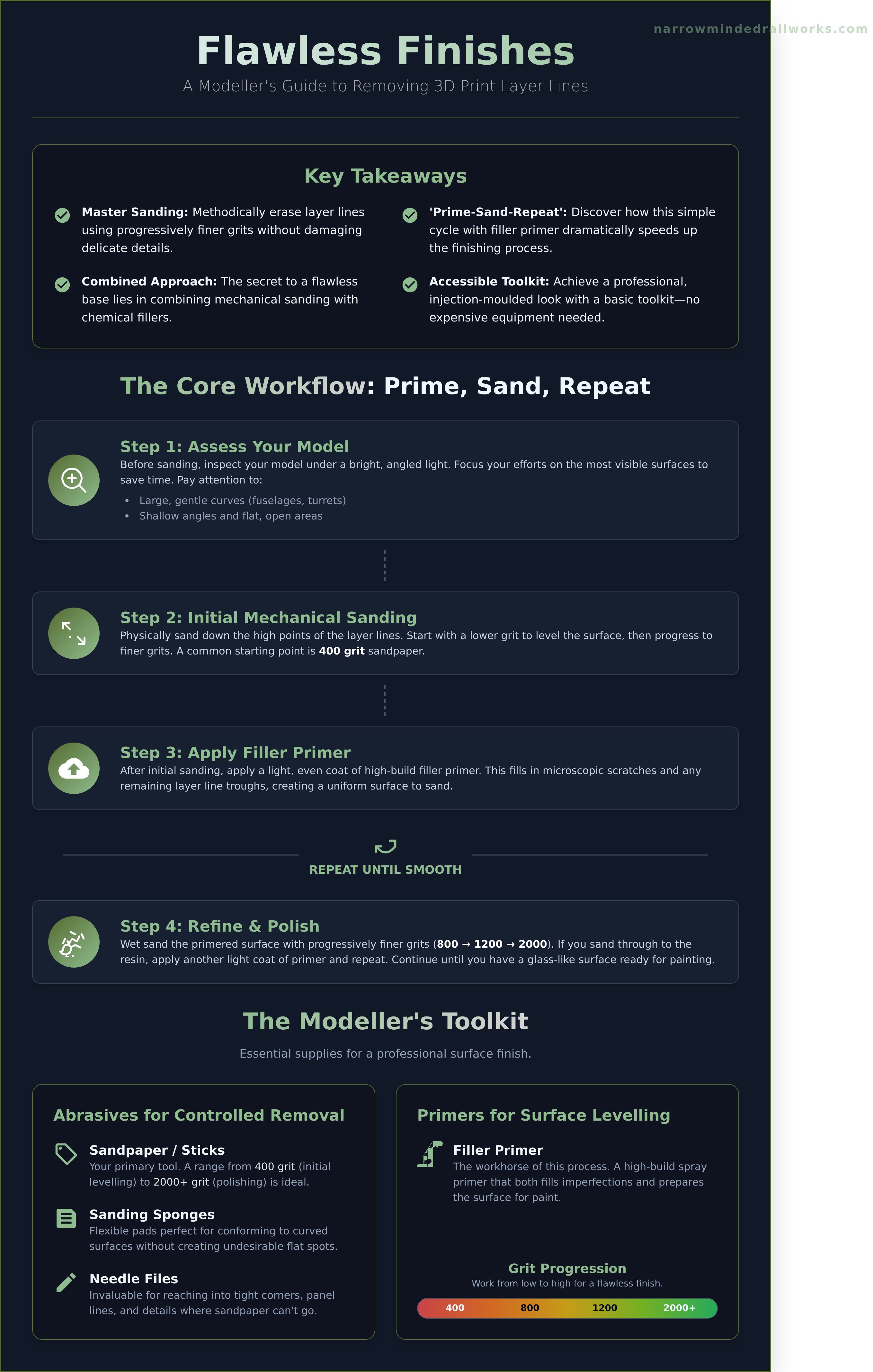
- Master the art of sanding with progressively finer grits to methodically erase layer lines without damaging delicate details.
- Discover how a simple 'Prime-Sand-Repeat' cycle with filler primer can dramatically speed up the surface finishing process for your models.
- The secret to effectively removing layer lines from 3d prints lies in combining mechanical sanding with chemical fillers for a flawless base.
- Achieve a professional, injection-moulded look with a basic toolkit; you don't need expensive equipment to get started.
Understanding Layer Lines: Why They Exist on High-Detail Models
Opening the box on a freshly printed, high-detail model kit is a fantastic feeling. But before you reach for your primer, it’s essential to address one of the inherent characteristics of the technology: layer lines. These fine, horizontal ridges are a natural and unavoidable part of the 3D printing process. While filament (FDM) printers produce very prominent lines, the resin (SLA/DLP) printers used for detailed model kits create far more subtle ones. Our goal isn't total eradication-which is often impossible-but to create a flawlessly smooth surface ready for painting. The first step in removing layer lines from 3d prints is understanding why they're there in the first place.
To see a practical method for smoothing these lines in action, the following video provides an excellent tutorial:
What Causes Layer Lines on Resin Prints?
Resin 3D printing is an additive manufacturing method where a model is built one slice at a time. A UV light source selectively hardens, or cures, liquid photopolymer resin layer by ultra-thin layer. This is the fundamental principle behind most 3D printing processes. The visibility of the resulting lines depends on factors like the printer's resolution, the chosen layer height (typically between 0.02mm and 0.05mm), and the orientation of the part on the build plate. Even the highest-quality print will have microscopic steps between these layers.
Assessing Your Model: When is Smoothing Necessary?
Before you start sanding, take a moment to inspect your model kit. Hold each part under a bright, angled light source; a desk lamp works perfectly. Using a magnifying glass can help you spot the faintest lines that might become visible under a coat of primer. Pay close attention to specific areas where lines are most likely to show:
- Large, gentle curves: Surfaces like a vehicle's turret, an aircraft fuselage, or a character's shoulder armour are prime candidates.
- Shallow angles: Surfaces printed at a low angle to the build plate can exhibit more pronounced stepping.
- Flat, open areas: Any large, smooth surface will reveal imperfections more readily than a highly detailed, textured area.
You’ll often find that intricate, recessed details or parts that will be hidden after assembly don’t need any work at all. Focusing your efforts on the most visible surfaces will save you time and lead to a much better final result.
The Modeller's Toolkit: Essential Supplies for Surface Finishing
Achieving a glass-smooth finish on your models doesn't require a professional workshop or a hefty budget. The process of removing layer lines from 3d prints is more about patience and the right supplies. Think of this as your essential checklist for getting started. While industrial research explores complex methods like automated surface finishing, the hands-on approach gives you, the modeller, complete control. Most of these items are readily available from hobby shops or online retailers in the UK.
Abrasives for Controlled Removal
The first stage involves physically sanding down the high points of the layer lines. Having a variety of abrasives allows you to tackle any shape or detail with precision. Start with a lower grit and progressively move to finer grits for a smoother result.
- Sandpaper or Sanding Sticks: A range from 400 grit for initial levelling up to 2000 grit for pre-polishing is ideal. Sanding sticks offer better control than loose sheets.
- Sanding Sponges: These flexible pads are perfect for conforming to curved surfaces without creating flat spots.
- Micro-Mesh Cloths: For the final step, these cushioned abrasive cloths can produce an almost mirror-like shine, especially when used wet.
- Needle Files: A small set of metal files is invaluable for reaching into tight corners, panel lines, and details that sandpaper can't access.
Primers and Fillers for Surface Levelling
Sanding removes material, but filling adds it back to create a perfectly uniform surface. This step is critical for hiding any remaining microscopic imperfections and ensuring your paint job is flawless. This combination of sanding and filling is the core technique for removing layer lines from 3d prints.
- High-Build Filler Primer: This is your secret weapon. A good quality automotive filler primer in a spray can (like those from Halfords or U-Pol) both primes the model and fills in tiny scratches and layer lines in one go.
- Spot Putty: For more significant blemishes or pinholes, a modelling putty like Tamiya Putty or Vallejo Plastic Putty allows for targeted application.
- Liquid Surfacer: Products like Mr. Surfacer 500 or 1000 can be brushed on to smooth textured areas or fill fine gaps.
Essential Safety Equipment
Never overlook your personal safety. Sanding resin or plastic creates fine dust, and primers and fillers release chemical fumes. Protect yourself properly-it’s a small investment for your long-term health.
- Respirator Mask: A proper mask with filters rated for both particulates (dust) and organic vapours (fumes) is a must-have.
- Safety Glasses: Protect your eyes from dust, debris, and accidental splashes of chemicals.
- Nitrile Gloves: Keep your hands clean, protect your skin from chemicals, and prevent oils from your fingers from affecting the model's surface.
Mechanical Methods: Sanding and Polishing Without Losing Detail
Of all the techniques for removing layer lines from 3d prints, sanding is the most fundamental and offers the highest degree of control. It’s a skill that, once mastered, will serve you on every single model you build. The core principle is simple: you use progressively finer grits of sandpaper to remove the scratches left by the previous, coarser grit, until the surface is perfectly smooth. Patience and a light touch are your greatest allies here; rushing the process will only create deeper scratches that are harder to remove later.
The Golden Rule: Why You Should Always Wet Sand
Always sand your 3D prints wet, especially resin parts. Submerging the part and sandpaper in a small tub of water provides essential lubrication. This prevents the sandpaper from clogging with plastic or resin dust, allowing it to cut more efficiently and last longer. More importantly, it traps the fine dust particles in a slurry, preventing you from inhaling them. The result is a far smoother, more refined finish than you could ever achieve by sanding dry.
A Step-by-Step Sanding Workflow
Achieving that glass-smooth surface ready for primer is a methodical process. This progressive sanding technique is a cornerstone of finishing, and while we focus on models here, you can find similar principles in a guide to smoothing PLA prints for more general projects. Follow these steps for consistent results:
- Start Coarse (400-600 Grit): Begin with a medium-grit paper to gently level the most prominent layer lines. Don't apply heavy pressure; let the paper do the work.
- Refine (800-1200 Grit): Move up to finer grits to remove the scratches left by the initial sanding. Your goal is to create a more uniform, satin surface.
- Polish (2000+ Grit): Finish with a 2000-grit or even higher polishing paper. At this stage, the surface should feel exceptionally smooth to the touch.
- Clean and Check: After each grit, wipe the part clean with a damp cloth to remove the slurry and inspect your progress before moving to the next step.
Techniques for Protecting Rivets and Panel Lines
The biggest fear when sanding is erasing the beautiful, crisp details of your model. To avoid this, work smart. Use high-quality masking tape to protect raised details like rivets or adjacent panels. Sand around these features, not over them. For tight spaces, use the firm edge of a sanding stick or a wrapped file for precision. If a recessed panel line becomes a little soft, don't worry. A quick pass with a panel line scriber before priming will restore its sharp definition perfectly.
Chemical Methods: Using Filler Primer to Do the Hard Work
While sanding is effective, it can be labour-intensive. For a more efficient approach that combines filling and sanding, nothing beats a quality filler primer. This is arguably the most popular method used by professional modellers for removing layer lines from 3d prints, and for good reason. It’s a thick, high-build primer designed to spray on and fill microscopic imperfections, including those pesky layer lines, doing much of the hard work for you.
The primer settles into the tiny grooves between layers, building them up so they are level with the high points. This significantly reduces the amount of sanding required to achieve a glass-smooth finish, preserving the fine details of your model kit.
How to Apply Filler Primer Correctly
Proper application is key to avoiding a thick, detail-obscuring mess. The goal is to build up thin layers that fill the lines without flooding the model. For best results:
- Shake the can thoroughly: This is not a quick 10-second shake. Agitate the can for at least two full minutes to ensure the thick filler solids are properly mixed.
- Use light, even coats: Hold the can about 20-30cm (8-12 inches) away from the model. Spray in short, sweeping passes rather than holding it in one spot.
- Avoid heavy coats: A heavy, wet coat will pool and can easily soften or completely hide fine details like rivets and panel lines. It's better to apply two light coats than one heavy one.
- Let it cure completely: Give the primer ample time to dry and harden. Check the manufacturer's instructions, but allow at least a few hours, or preferably overnight, before handling or sanding.
The 'Prime-Sand-Repeat' Cycle Explained
This is the core technique for achieving a flawless surface. After your initial coat of primer has cured, you begin a simple but effective cycle. Wet sand the surface with a fine grit sandpaper (800-1200 grit is ideal). As you sand, the primer will be removed from the high spots, revealing the bare plastic, but it will remain in the low spots-the layer lines. This visual contrast is your guide. The goal is to repeat this process of applying a light coat and sanding until you have a perfectly uniform, smooth grey surface with no plastic showing through.
Using Spot Putty for Deeper Imperfections
Sometimes, even after priming, you might find a stubborn deeper line, a small pinhole from the printing process, or a slight seam. For these, a spot putty is your best friend. Simply apply a tiny amount of modelling putty directly into the blemish with a toothpick or sculpting tool. Let it dry completely, then gently sand it flush with the surrounding surface. A final light coat of primer will blend the repair perfectly. Our kits are printed on high-resolution machines to minimise these issues from the start. Explore our range to see the quality for yourself.
Advanced Techniques for a Flawless, Glass-Like Surface
Once you have mastered the basics of sanding and priming, you may find yourself aiming for a truly exceptional, contest-quality finish. The methods below require more skill, specialised products, or a greater time investment, but the results can be spectacular. For modellers dedicated to completely removing layer lines from 3d prints for a show-stopping result, these advanced techniques offer unparalleled smoothness.
Using Liquid Surfacers (Mr. Surfacer / Tamiya)
Liquid surfacers from brands like Mr. Hobby (Mr. Surfacer) and Tamiya are a modeller's secret weapon. Thicker than primer, these can be brushed directly into recessed areas or thinned with a levelling thinner and airbrushed over the entire model. This creates a fine, buildable layer that fills micro-scratches and layer lines without obscuring detail. Once fully cured, it sands to a perfect, buttery-smooth finish, ready for the final colour coats.
Adding a Clear Resin Coat
For specific applications like scale car bodies or visors where a deep, glass-like shine is paramount, a thin coat of UV resin can work wonders. After initial sanding, a self-levelling UV-curable resin is carefully brushed on and then cured under a UV lamp. This process effectively encases the part in a perfectly smooth, clear shell. Warning: This is an aggressive technique that can easily flood and obliterate fine panel lines, rivets, and other delicate surface details if applied too heavily. Use it with extreme caution.
What to Avoid: Vapour Smoothing
You may see tutorials online for "vapour smoothing" 3D prints using acetone vapour to melt the surface smooth. It is critical to understand that this method only works for FDM prints made from ABS or ASA filament. Attempting to vapour smooth a standard UV-cured model resin print will not work. At best, nothing will happen; at worst, the solvent will make the resin brittle, sticky, or cause it to warp, permanently ruining your model kit part.
Achieving that perfect finish is a rewarding part of the model-making process. For more specialised modelling supplies and advice, explore the range at Narrow Minded Railworks.
From Printed to Perfect: Mastering Your Model's Finish
Transforming a raw 3D print into a masterpiece is a deeply rewarding part of any modeller's craft. As we've explored, visible layers don't have to be a permanent feature of your detailed models. By mastering a combination of careful sanding and the clever application of filler primers, the task of removing layer lines from 3d prints becomes a manageable, even enjoyable, process. This final finishing stage is what elevates a good model to a truly exceptional one, ready for the paint shop.
Of course, a great finish always begins with a great print. That's why at Narrow Minded Railworks, our kits are designed by modellers, for modellers. We use high-quality resin to minimise layer lines from the outset, giving you a superior canvas for your work. Perfect for creating unique narrow gauge layouts, our models provide the detail and quality your project deserves. Armed with the techniques in this guide, you're ready to achieve a flawless result.
Ready to build? Explore our range of high-detail 3D printed kits!
Frequently Asked Questions
Will sanding remove all the fine rivet and panel line details on my kit?
There is a risk of softening or erasing fine details with heavy sanding. To prevent this, use fine-grit sandpaper (800+) and work carefully around these areas. You can also use masking tape to protect delicate sections. For recessed panel lines that become shallow, they can be carefully re-scribed using a specialised scribing tool after the main sanding and priming stages are complete, restoring that crisp, defined look to your model.
How do I know when I'm done sanding and the surface is smooth enough?
Use both touch and sight. Run your fingertips across the surface; it should feel perfectly smooth with no ridges. For a visual check, hold the part at a low angle under a bright light, which will highlight any remaining imperfections by casting small shadows. The ultimate test is to apply a light coat of primer. This uniform colour will immediately reveal any tiny layer lines or sanding marks that still need attention before you apply your final paint.
Can I use a Dremel or other rotary tool to speed up the process?
Using a rotary tool on plastic FDM prints is generally not recommended. The high speed generates friction and heat, which can easily melt and gouge the plastic, creating more repair work. While it might be used very cautiously on its lowest setting for removing large support marks, manual sanding with blocks or sanding sticks provides the control needed for a smooth, even finish without the risk of heat damage to your model's surface.
What's the best brand of filler primer for model kits?
In the UK market, model makers often rely on Tamiya Surface Primer or Mr. Hobby's Mr. Surfacer range (e.g., 1000 or 1200). These are prized for their ultra-fine pigments that effectively fill tiny scratches and layer lines without obscuring detail. A standard spray can costs around £8 to £15. For larger imperfections, it's best to first use a dedicated putty, such as Vallejo Plastic Putty, before applying your filler primer coat.
Do I need to do this for every 3D printed model I build?
It depends entirely on the print quality and your desired final appearance. A high-resolution resin print or an FDM print with a very low layer height (e.g., 0.08mm) might only require minimal cleanup. However, for most standard FDM prints, the process of removing layer lines from 3d prints is crucial if you want to achieve a smooth, professional finish that resembles a traditional injection-moulded kit, especially under a gloss or metallic paint.
How is finishing a resin print different from finishing a standard FDM (filament) print?
The processes differ significantly. Resin prints have much finer layer lines, often only needing gentle wet sanding with high-grit paper. However, resin dust is toxic, so wearing a respirator and wet sanding to control dust are mandatory safety steps. Finishing an FDM print is less hazardous but more labour-intensive, as the prominent layers require more aggressive sanding and the use of filler primers. The goal is the same, but the techniques are distinct.