

Printing at home isn’t automatically cheaper: the answer to whether it’s cheaper to 3D print your own models depends on how often you print and how much material each model uses. For occasional, one-off prints, a service can avoid the upfront cost of a printer; repeated prints can make owning one more economical. Failed prints and long machine time can narrow that difference.
It’s easy to focus on filament because it’s the most visible cost. But material is only part of the calculation: larger models and failed prints can use more than expected.
This guide explains how material use, model scale, printing speed and failures affect the total cost in the UK. You’ll see which costs to include when comparing home printing with a print service, and why a quick, reliable print may offer better value even when the material itself is inexpensive.
Key Takeaways
- Compare the full cost of owning a printer, including setup and upkeep, with the price of getting individual models printed.
- Estimate material use from the model’s size and geometry, since a larger or more complex shape can need more filament.
- Include print time and failed attempts in your comparison; low material use alone doesn’t guarantee a low-cost result.
- For narrow-gauge railway projects, explore ready-to-build kit options alongside the costs of printing models yourself.
How much do 3D printing materials cost?
Material is only one part of the home-printing budget. A budget printer and a premium machine have different upfront costs, while filament, resin, repairs and electricity affect running costs. Buying a model file or paying for a custom design adds a separate expense, particularly for a one-off print.
Material Costs for Plastics and Metals
Material cost is the amount of printing stock used to make a model, such as plastic filament, resin or metal powder. PLA and ABS are common plastics; titanium and stainless steel are examples of metal-printing materials. Metal materials cost substantially more per kilogram than basic plastic, so the process and material can change a project’s economics.
For a small PLA part, calculate material cost from the grams used and the filament price per kilogram. Larger parts use more stock, and supports and waste add to consumption. Compare the slicer’s material estimate with the finished model’s dimensions, rather than treating the spool price as the cost of a single print.
Factors That Influence Printing Costs
Print cost reflects material use, machine time, model dimensions and infill, the internal structure that supports a print. More infill or a larger model generally uses more filament; a longer print also consumes electricity and occupies the machine for longer. A low material estimate can therefore understate the full cost.
For example, compare two versions of the same model in slicing software, one with less infill and one with more. Check how the material estimates and print durations change before choosing. If you plan to sell prints in the UK, read the model file’s licence and get the rights holder’s permission unless the licence clearly allows commercial sales.
Resin and Filament Cost Comparison
Resin printing uses liquid resin, while filament printing feeds plastic through a heated nozzle. Standard resin generally costs more per kilogram than PLA filament, so filament may cost less in material alone. The printer type, model detail and post-processing needs also affect the overall comparison.
To estimate the full cost, include the printer purchase, consumables and upkeep. A premium machine may cost more upfront than a budget option, while a purchased model file or custom design adds an expense before printing begins. Reusing a design across multiple prints spreads that one-off design cost; for a single model, it remains part of the total.
How Much Cheaper Is Home 3D Printing Compared to a Print Service?
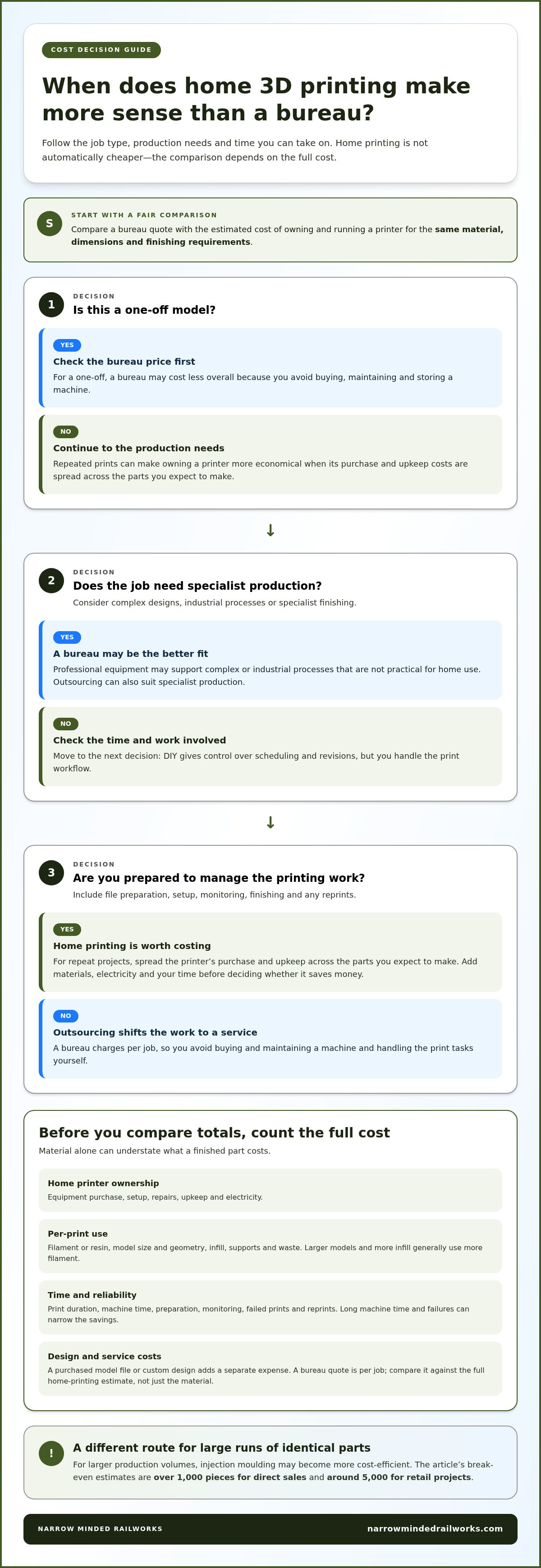
Home printing can reduce the cost of repeat parts, but buying a machine adds an upfront expense. To decide whether it is cheaper to 3D print your own models, compare the full cost of owning and running a printer with the bureau’s price for the same job.
Home Printer Versus Printing Bureau
A home printer involves equipment, materials, electricity, upkeep and time spent preparing prints. A professional printing bureau charges per job, so you avoid buying and maintaining a machine. Its equipment may also support complex or industrial processes that aren’t practical for home use.
Compare quotes for matching materials, dimensions and finishing requirements. For repeat projects, spread the printer’s purchase and upkeep costs across the parts you expect to make. For a one-off model, a bureau may cost less overall because you don’t need to buy or store a machine.
DIY Printing Versus Outsourcing
DIY printing gives you control over scheduling and revisions, but you handle setup, monitoring and finishing. Outsourcing shifts those tasks to a service, which can suit complex designs or specialist production. Factor in your time too, including file preparation and any work involved in reprints.
Whether it is cheaper to 3D print your own models for a repeat build depends on how often you’ll use the machine and whether the parts need specialist finishing. Compare the bureau’s full quote with your estimated ownership costs, rather than comparing its price only with the material used at home.
Buying an off-the-shelf item is another option. A standard phone stand, for example, may be simpler to purchase, while printing can suit a customised shape or several design variations. For identical parts at larger production volumes, injection moulding may become more cost-efficient: the break-even estimates are over 1,000 pieces for direct sales and around 5,000 for retail projects.
Does scaling down 3D models affect costs?
Yes. Scaling changes the amount of material needed, but geometry and print settings also affect the final cost. A smaller model isn’t always proportionally cheaper if its shape needs supports or careful handling.
Part Size and Geometry Costs
Part size and geometry describe the space a model occupies and the shape the printer must build. Both matter because the slicer calculates material and print time from the model’s volume, walls, supports and internal structure.
A 10 cm cube has about double the volume of an 8 cm cube, so scaling dimensions doesn’t change material use in a simple one-to-one way. Hollow sections can reduce material, while intricate details and unsupported overhangs may require extra supports. Compare the slicer estimates before choosing a scale, especially for prototypes where details must remain usable.
A 3D Benchy is a useful example for costing a small print: at approximately 15 grams, it uses a modest amount of PLA. That figure gives a material quantity to compare against larger versions, but not a complete price. The average cost per part also depends on the filament rate, supports, print duration and unsuccessful attempts.
Minimum Cost Per Part
The minimum cost per part is the lowest amount attributable to producing one finished item, not just its material cost. It helps you decide whether to print a small model on its own or include it in a larger build.
Even a tiny model requires machine setup and a print cycle. Those costs don’t shrink in proportion to the model, so a small part can cost more relative to its material use. Printing multiple copies together can spread setup and machine time across the batch, provided they fit the build area and print successfully.
For repeat production, compare the material estimate and machine time for one model with those for a batch. For a single prototype, prioritise the required dimensions and details: scaling down too far may save material but make features unusable. Geometry, scale and quantity together give a more useful comparison than size alone.
Print speed and failure rates
Print speed affects machine time, while failures waste both time and material. A Benchy comparison shows why a faster print can matter: one took over 90 minutes, compared with 34 minutes on a premium printer.
Print Speed and Production Time
Print speed is how quickly a machine completes a model, and it matters because production time affects how efficiently you can make parts. A premium printer can be up to three times faster than a standard budget model.
That difference may help with repeated prints, but speed alone doesn’t determine value. Faster settings can affect surface quality, so choose settings suited to the model’s detail and intended use. A smooth finish may require slower printing or extra finishing work.
Compare total production time, not just the printer’s advertised speed. A larger or more intricate model can take longer, even on a fast machine. For a single prototype, accurate dimensions may matter more than time saved; for a batch, shorter cycles can make home production more efficient.
Failure Rates and Printing Costs
A failed print adds cost because the material and machine time already used produce no usable part. This matters especially for long jobs: a print that fails after 19 hours of a planned 20-hour run wastes nearly a full day of machine time.
Failed prints can also increase the time needed to finish a batch. Check the setup and early layers before starting a long print, and consider whether a smaller test print could reveal problems. A test uses material too, but may limit waste if the full model would otherwise fail late.
When comparing home printing with a service, include likely reprints and the time you spend monitoring or restarting the machine. A low material estimate can become expensive if a long print fails near completion. For an alternative approach to railway modelling, browse model railway kits.
Narrow Minded Railworks: OO9 Locomotive & Wagon Kits
Narrow Minded Railworks offers OO9 Locomotive & Wagon Kits for railway modellers weighing home printing against a kit-based project. A kit provides a defined starting point, while printing your own model gives you control over its design and production process.
For other narrow-gauge projects, the range also includes GN15 Locomotive & Scenery Kits and O-16.5 / 7mm Scale Kits. Diorama Tools & Scenery can complement a layout or display. These options are relevant when you want to build a specific scale or add scenery, rather than print every component yourself.
Explore the kits and accessories at Narrow Minded Railworks, or visit narrowmindedrailworks.com.
Choose the Best Route for Your Next Build
Turn your cost comparison into a decision about a specific project, rather than relying on a general rule. Choose a model you intend to make and define what matters most, such as custom fit, repeatability, finish or time. That makes the question of whether it’s cheaper to 3D print your own models relevant to your needs, not just the filament estimate.
For railway modelling, decide whether you want to design and manage every printed component yourself or use a kit as the foundation for your build. Your preferred approach may vary by project, so start with the result you want: a test piece, a customised part or a layout element. Keeping that goal clear helps you choose a practical next step as your modelling develops.
Explore the options for your next project by contacting Narrow Minded Railworks. Whatever route you choose, a clear plan can help you turn an idea into a build you’re pleased with.
Frequently Asked Questions
So, Is 3D Printing Expensive?
It can be inexpensive for a small, repeatable part, but costly if you buy a printer for one project. For example, a single customised component may avoid the expense of altering an off-the-shelf item, while repeated failed prototypes add material and machine time. Decide based on your expected print volume, the value of your time and whether you’ll use the machine again.
What affects the price of 3D printing?
The main cost drivers are material, model dimensions and geometry, print duration, finishing and equipment. A hollow design may use less material than a solid version, while supports or intricate features can add work. For a practical estimate, use the slicer’s material and time calculations, then include finishing and any reprints needed to produce a usable part.
How much does a 3D printer cost in the UK?
UK printer prices vary with the printing process, build capacity and machine capability, so compare equipment suited to your intended models instead of choosing on purchase price alone. A compact machine for occasional prototypes has different requirements from one used for frequent, larger builds. Include ongoing material, maintenance and setup in your budget, then consider how many projects will share those costs.
How much do PLA, PETG and resin cost per kilogram in the UK?
Compare UK-listed filament spool or resin-container prices per kilogram, since pack sizes vary. A print’s material cost then depends on how many grams its design and supports consume. PLA, PETG and resin are different materials, so compare the specific product you plan to use rather than assuming one price applies to all three. Include waste in your project estimate.
How much electricity does a 3D printer use, and what does it cost per print in the UK?
Desktop FDM printers typically use 50-150 watts while printing. To estimate a UK print’s electricity cost, convert the printer’s wattage into kilowatts, multiply by print hours, then multiply by your electricity unit rate in pounds per kilowatt-hour. For instance, a longer job increases consumption even if the model uses little filament. Actual use varies with the machine and its operating conditions.
How much do typical 3D-printed models cost in filament or resin?
There isn’t one typical material cost for every model; calculate it from the grams used and the relevant material’s price per gram. A 3D Benchy weighing approximately 15 grams offers a useful small-print reference for estimating filament use. A larger or more solid design consumes more material, while resin costing also depends on the volume required and leftover material that can’t be reused.